> ## Documentation Index
> Fetch the complete documentation index at: https://docs.getpara.com/llms.txt
> Use this file to discover all available pages before exploring further.
# Create policies in Developer Portal
> Configure a policy with the Developer Portal forms, then activate it on a Development key
Para Permissions lets you control which transactions wallets can sign. You configure policies in the [Developer Portal](https://developer.getpara.com), test them against a Development API key, and work with Para to publish the production configuration.
App-owned wallets can sign by default unless a Guardrail blocks the transaction. User-owned wallets require review unless the user has granted a matching Request.
While Permissions is on, Para denies raw signatures for app-owned and user-owned wallets unless an active policy that applies to the wallet has a rule allowing the `raw_signature` action. Raw signatures include `sign-raw` requests and message signing from wallets that cannot sign as EVM, such as Solana, Stellar, and Sui wallets. The Developer Portal forms cannot create this rule; use [JSON authoring](/v3/cli/permissions).
Permissions supports EVM, Solana, Cosmos, Stellar, and Sui wallets. The Developer Portal forms cover a subset of policy shapes; use [JSON authoring](/v3/cli/permissions) or work with Para for other supported configurations. Each policy selects one wallet type and can narrow it to specific networks, and each rule names the actions it governs. Check the [policy reference](/v3/references/permissions/policy-json) for the facts supported by each request.
## Choose a policy type
Permissions separates two different wallet experiences:
| Policy type | Use it for | What it does |
| - | - | - |
| **Guardrails** | App-owned wallets used through the REST API | Sets limits for selected transaction types. A selected transaction outside those limits is denied; other app-owned transactions stay allowed. |
| **Requests** | User-owned wallets used through a Para SDK | Lets the user grant standing access for matching transactions. Future matching transactions can sign without another prompt when no other applicable policy denies them or requires approval; other transactions require manual review. |
Requests always require user consent. Guardrails do not show a consent request because the application owns the wallet.
 ## Configure a Development policy
Start with a Development API key. Policies created for one API key do not affect another key. To start from a common policy shape, see [Guardrail templates](/v3/general/permissions-guardrail-templates) and [Request templates](/v3/general/permissions-request-templates).
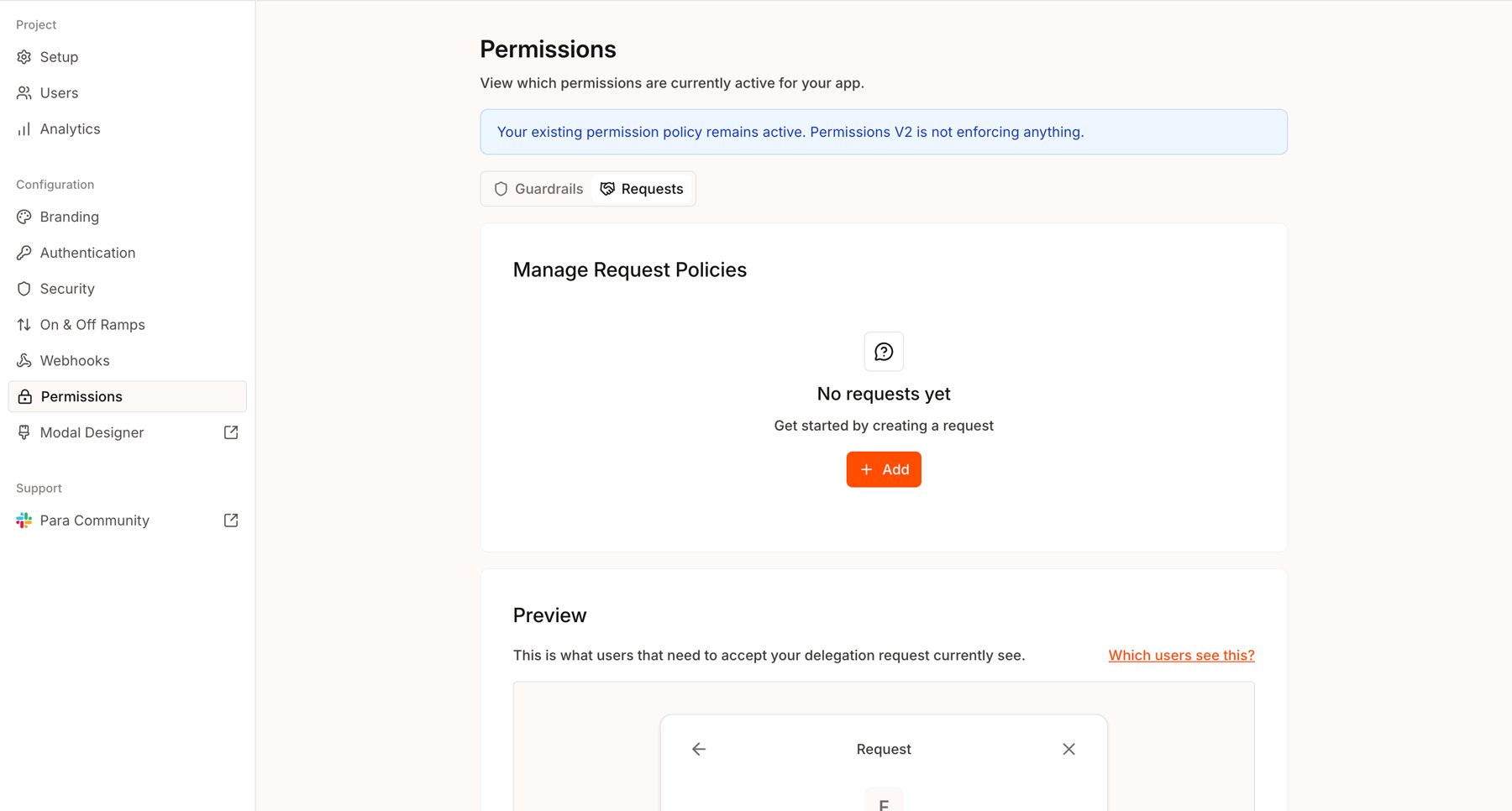
Select your project and **Development** API key in the Developer Portal, then open **Permissions** from the sidebar. Choose **Guardrails** or **Requests** based on the wallet ownership model above.
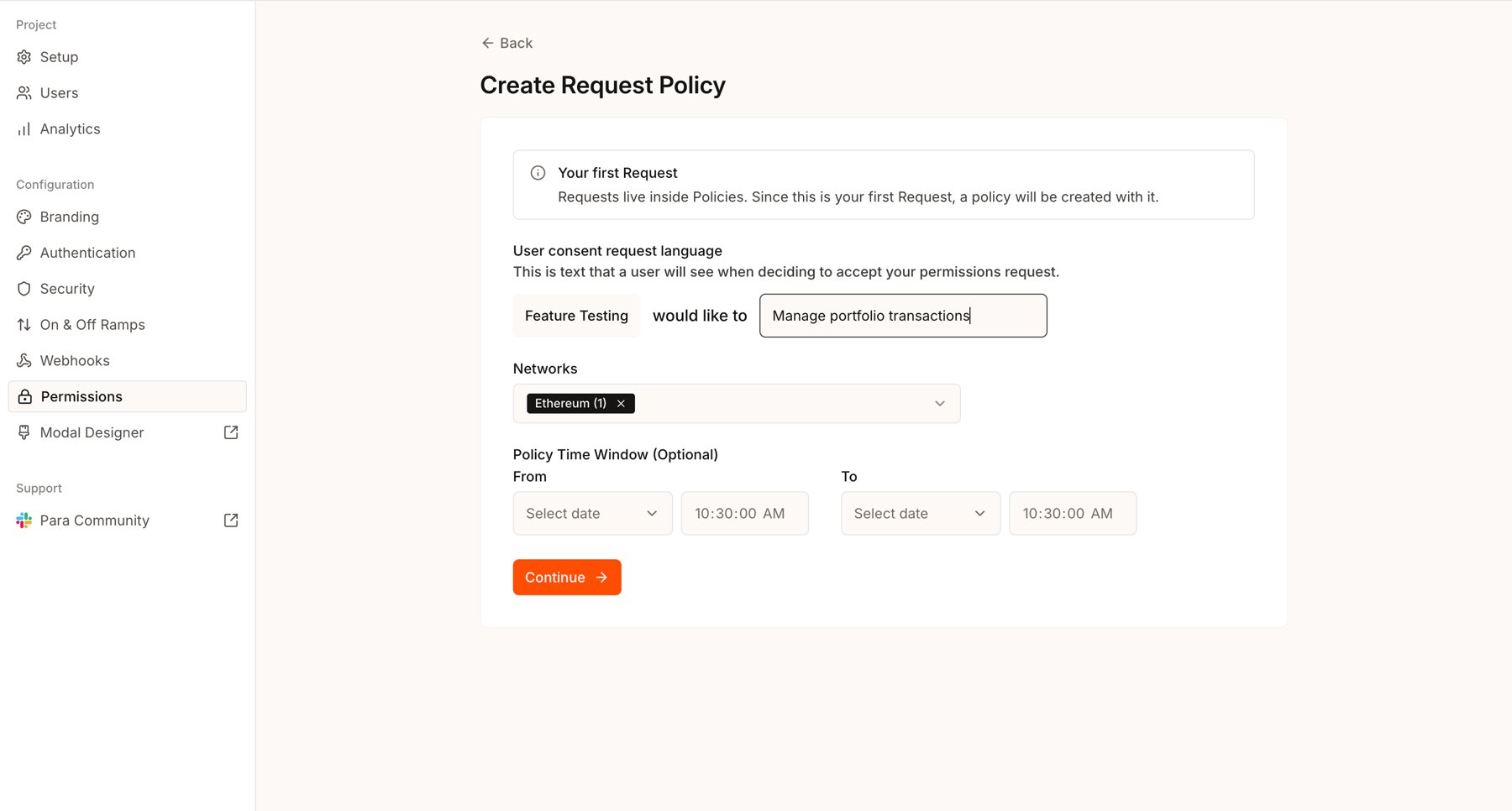
Select **Add**. For a Request, enter the plain-language text users will see when deciding whether to grant access. Select one or more networks from a single wallet type and, if needed, an optional start and end time for the policy. Selecting a wallet type group, such as **EVM** or **Solana**, covers every network of that type. You can also select individual Solana and Sui networks, such as Mainnet or Devnet.
## Configure a Development policy
Start with a Development API key. Policies created for one API key do not affect another key. To start from a common policy shape, see [Guardrail templates](/v3/general/permissions-guardrail-templates) and [Request templates](/v3/general/permissions-request-templates).
Select your project and **Development** API key in the Developer Portal, then open **Permissions** from the sidebar. Choose **Guardrails** or **Requests** based on the wallet ownership model above.
Select **Add**. For a Request, enter the plain-language text users will see when deciding whether to grant access. Select one or more networks from a single wallet type and, if needed, an optional start and end time for the policy. Selecting a wallet type group, such as **EVM** or **Solana**, covers every network of that type. You can also select individual Solana and Sui networks, such as Mainnet or Devnet.
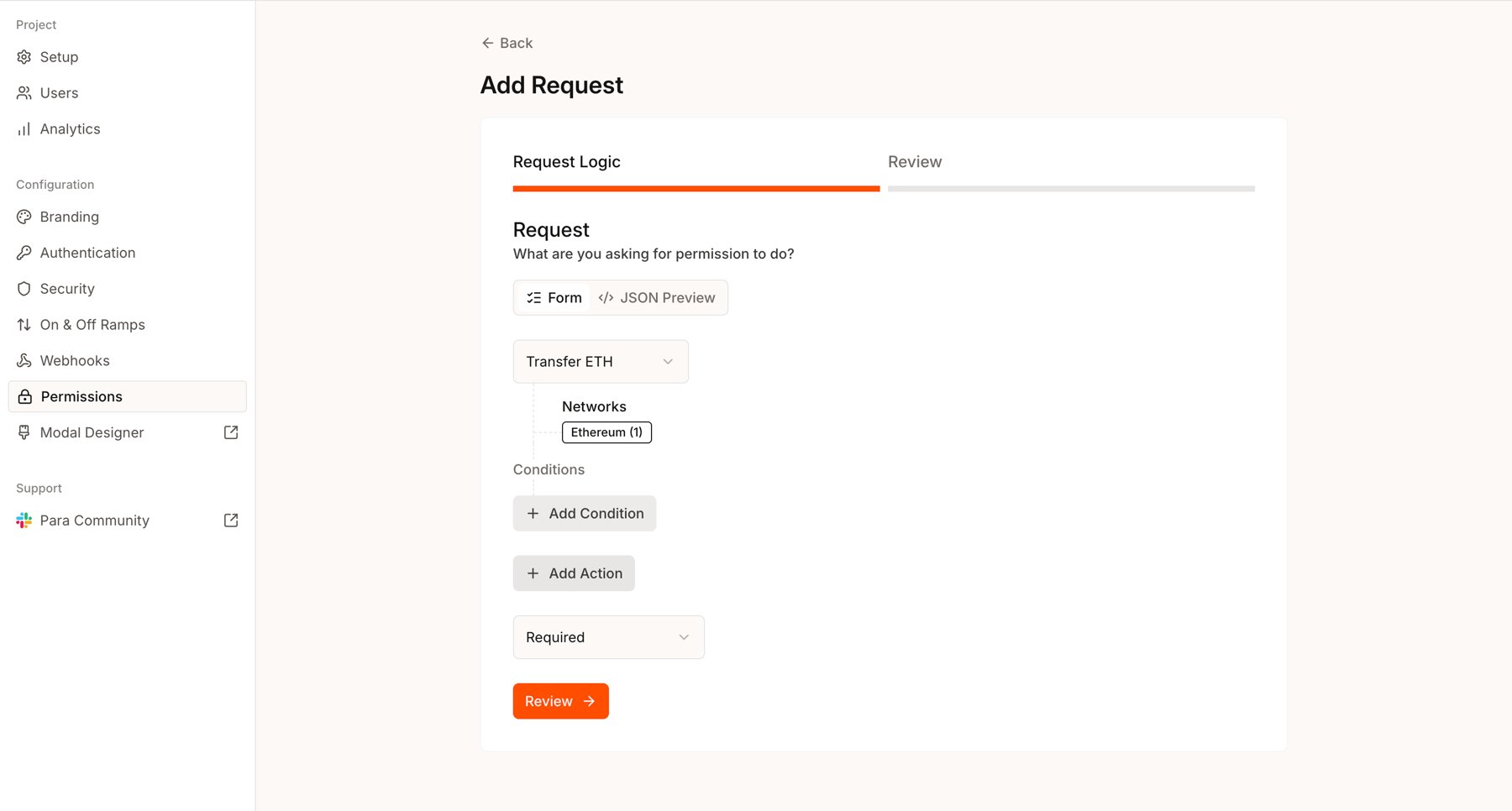
 Add the actions the app needs and narrow each action with an available condition. For example, allow native transfers on Ethereum up to a fixed amount, or limit a contract call to a particular function and argument.
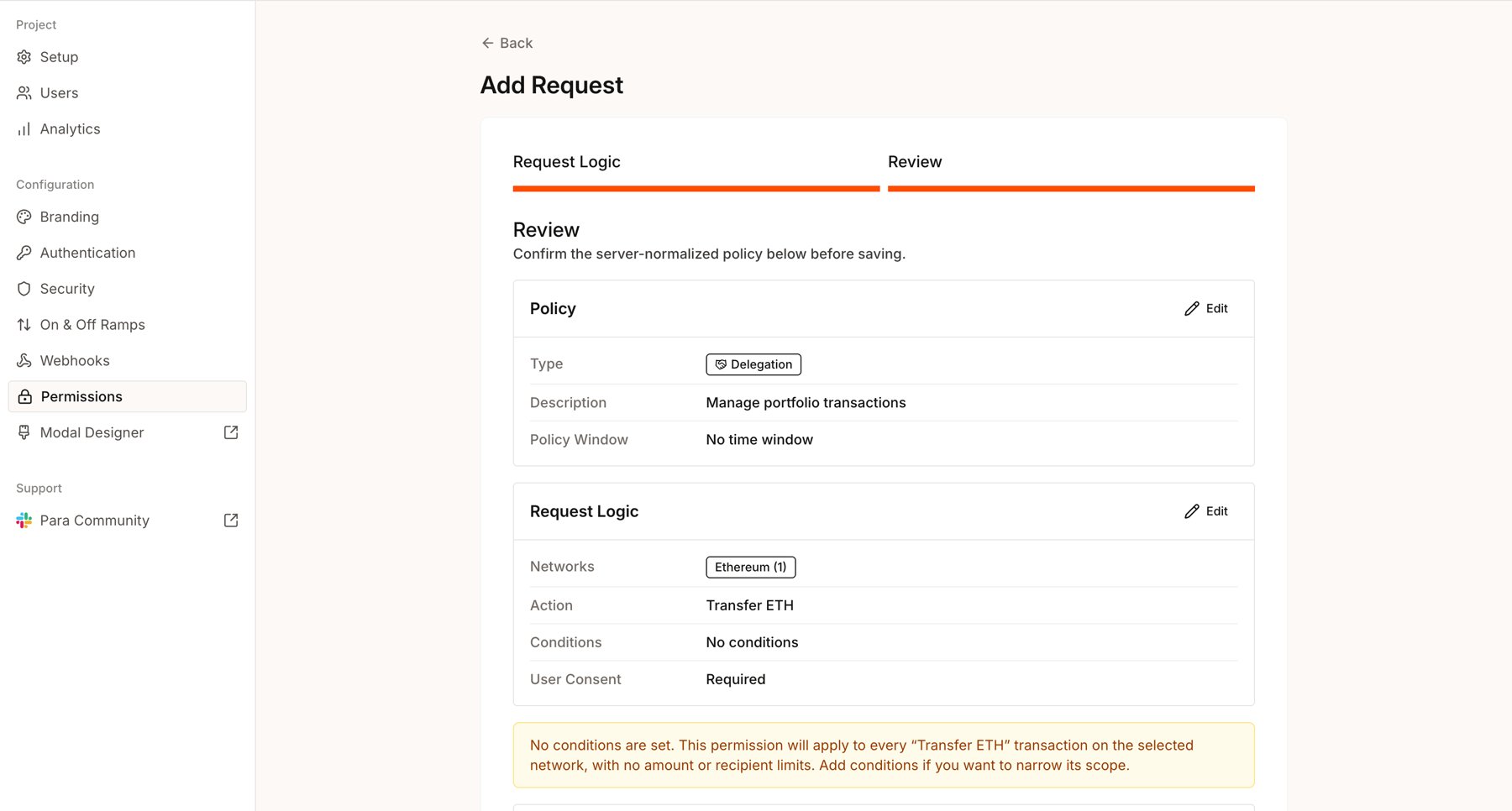
 Select **Review** to inspect the server-normalized policy and any warning about broad access. Select **Save Draft** only when the summary matches your intent. A draft is inert and does not change signing behavior. If the policy overlaps active policies, Review lists them. All overlapping policies apply, and a block in any overlapping Guardrail wins.
 Activate the draft when you are ready to use it on the Development key. The first active policy automatically enables Permissions for that key. A policy affects signing only while it is active and within its time window. Test at least one transaction that should match and one that should not before requesting production review.
Saving and activating are separate actions. **Save Draft** does not enforce the policy.
Permissions stays on for a key only while at least one active policy is inside its time window. When the last one is deactivated or its window ends, Permissions turns off for the key and signing returns to the key's behavior before Permissions, including requests that were waiting for consent or approval.
## Actions and conditions
The current Portal flow supports these transaction actions for EVM networks:
* Transfer ETH
* Transfer tokens
* Call a contract
* Execute a Safe transaction
* Deploy a contract
For Solana, Cosmos, Stellar, and Sui networks, it supports:
* Native transfer
* Token transfer (not available on Sui)
* Execution target
Depending on the action, you can set per-transaction or cumulative spending limits, restrict recipients, or require a specific contract, function, or argument. Cumulative limits use a window of hours, days, or weeks. An optional policy window controls when the policy applies. The available controls are described in the [Permissions Reference](/v3/references/permissions/policy-json).
Spending limits cover native transfers on every wallet type and token transfers on EVM (ERC-20), Solana, Cosmos, and Stellar. Sui limits cover native transfers only. A token limit counts only the asset it names. Each network and asset has its own budget, so a limit of 1 ETH per day on Ethereum and Base allows 1 ETH per day on each network. Amounts Para cannot decode do not count toward a limit. Smart account user operations do not count toward EVM limits, except ERC-20 transfers sent through Para [gas sponsorship](/v3/rest/gas-sponsorship).
The Portal covers common policy shapes. A Request action can combine up to 8 conditions, all of which must hold; a Guardrail action takes one condition. For nested logic such as `any` groups, more conditions, raw signature rules, or multiple rules that work together, use [JSON authoring with the CLI](/v3/cli/permissions) or contact Para for assistance.
## Selectors and versions
The policy type and complete network selection identify the policy you are editing. Network order does not matter, so **Ethereum + Base** is the same selector as **Base + Ethereum**. **Base only** is a different selector and creates an independent policy.
Editing an existing selector creates the next version of that policy. Changes to an active policy replace the active version when saved, while changes to a draft remain in draft. Resolve the current draft by activating or discarding it before creating another draft.
Editing an active policy and selecting **Save changes** replaces the active version immediately. Test active-policy changes on the Development key before requesting a Production update.
## Production
Development and Production API keys are independent. Creating a Production key does not copy the Development policy, activate Permissions, or change the Production key's existing signing behavior.
After you have validated the active Development policy:
1. Create the Production API key.
2. Open the Production key and select **Request production review**. This action appears when Development has an active policy and the Production key is still awaiting permissions setup.
3. Para reviews the active Development policy and independently publishes the approved policy for the Production key.
4. Verify the published Production policy in the Portal before sending production traffic.
The Production Permissions page is read-only. It can appear empty until Para publishes the approved policy.
## Integration guides
This documentation is built and hosted on [Mintlify](https://mintlify.com), a developer documentation platform.
Activate the draft when you are ready to use it on the Development key. The first active policy automatically enables Permissions for that key. A policy affects signing only while it is active and within its time window. Test at least one transaction that should match and one that should not before requesting production review.
Saving and activating are separate actions. **Save Draft** does not enforce the policy.
Permissions stays on for a key only while at least one active policy is inside its time window. When the last one is deactivated or its window ends, Permissions turns off for the key and signing returns to the key's behavior before Permissions, including requests that were waiting for consent or approval.
## Actions and conditions
The current Portal flow supports these transaction actions for EVM networks:
* Transfer ETH
* Transfer tokens
* Call a contract
* Execute a Safe transaction
* Deploy a contract
For Solana, Cosmos, Stellar, and Sui networks, it supports:
* Native transfer
* Token transfer (not available on Sui)
* Execution target
Depending on the action, you can set per-transaction or cumulative spending limits, restrict recipients, or require a specific contract, function, or argument. Cumulative limits use a window of hours, days, or weeks. An optional policy window controls when the policy applies. The available controls are described in the [Permissions Reference](/v3/references/permissions/policy-json).
Spending limits cover native transfers on every wallet type and token transfers on EVM (ERC-20), Solana, Cosmos, and Stellar. Sui limits cover native transfers only. A token limit counts only the asset it names. Each network and asset has its own budget, so a limit of 1 ETH per day on Ethereum and Base allows 1 ETH per day on each network. Amounts Para cannot decode do not count toward a limit. Smart account user operations do not count toward EVM limits, except ERC-20 transfers sent through Para [gas sponsorship](/v3/rest/gas-sponsorship).
The Portal covers common policy shapes. A Request action can combine up to 8 conditions, all of which must hold; a Guardrail action takes one condition. For nested logic such as `any` groups, more conditions, raw signature rules, or multiple rules that work together, use [JSON authoring with the CLI](/v3/cli/permissions) or contact Para for assistance.
## Selectors and versions
The policy type and complete network selection identify the policy you are editing. Network order does not matter, so **Ethereum + Base** is the same selector as **Base + Ethereum**. **Base only** is a different selector and creates an independent policy.
Editing an existing selector creates the next version of that policy. Changes to an active policy replace the active version when saved, while changes to a draft remain in draft. Resolve the current draft by activating or discarding it before creating another draft.
Editing an active policy and selecting **Save changes** replaces the active version immediately. Test active-policy changes on the Development key before requesting a Production update.
## Production
Development and Production API keys are independent. Creating a Production key does not copy the Development policy, activate Permissions, or change the Production key's existing signing behavior.
After you have validated the active Development policy:
1. Create the Production API key.
2. Open the Production key and select **Request production review**. This action appears when Development has an active policy and the Production key is still awaiting permissions setup.
3. Para reviews the active Development policy and independently publishes the approved policy for the Production key.
4. Verify the published Production policy in the Portal before sending production traffic.
The Production Permissions page is read-only. It can appear empty until Para publishes the approved policy.
## Integration guides
This documentation is built and hosted on [Mintlify](https://mintlify.com), a developer documentation platform.